Image Resizer & Compressor6.5.0
Publisher Description
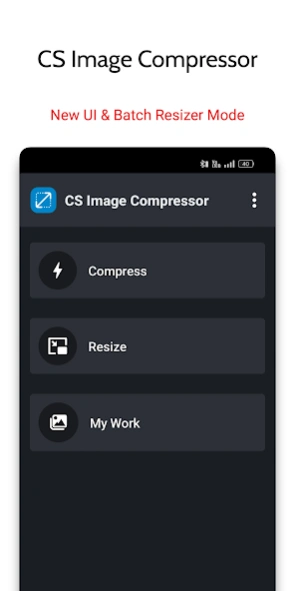


Resize images, compress photos, and crop pictures easily with this smart tool
Resize and compress your photos effortlessly with our powerful Image Resizer & Compressor. Whether you need to reduce image size for storage, sharing, or social media, this app makes it quick and easy while maintaining quality.
Got hundreds of photos? No worries! Our bulk image resizer and compressor lets you resize or compress multiple images at once. No manual saving needed—resized images or compressed photos are automatically stored in a separate folder.
Even more, our free image compressor and resizer app also features an advanced jpg, jpeg, png, webp and bmp converter saving you tons of time needed to convert image formats online.
With advanced compression options, you can shrink images fast without losing clarity. Plus, our built-in photo editor allows you to resize, edit, and convert image formats, making it an all-in-one image optimization tool.
⭐ Image Compressor And Resizer App Feature
● Batch Resizing/Compression (multiple photos compression/resize)
● Convert photos into JPG, JPEG, PNG, WEBP, BMP
● Change aspect ratio and adjust its resolution
● Compress Photos to a specified file size
● Adjust photos resolution to any custom resolution
● Compress photo without losing its quality
● Manual adjust photo/picture’s size
● Scale up and down image resolution
● Reduce size of image from MB to KB
● Live preview of the selected images
● Preserve aspect ratio of photo
● Keep EXIF data
● Support png transparency
● Comparison mode (Compare between original and compressed photos)
● Manage all saved photos directly from the app
⭐ COMPRESS PHOTOS & SHRINK PHOTO SIZE
Compress your photos the way you want with two simple options:
✅ By Percentage – Just slide to set a value from 1 to 100%. The higher the percentage, the smaller the file size. Perfect for quick resizing while keeping good quality.
✅ By File Size – Need your image to be exactly 100 KB or 300 KB? Just enter the size, and the app will compress it to match—no guesswork needed!
⭐ RESIZE PHOTOS WITH CUSTOM RESOLUTION
Easily resize your photos with full control over width and height!
✅ Fit to Both – Set both width and height manually and the app resizes your photo instantly.
✅ Fit to Width – Enter a width, and the height adjusts automatically to maintain proportions.
✅ Fit to Height – Enter a Height, and the Width adjusts automatically to maintain proportions.
Whether you need custom dimensions or automatic scaling, our smart resizer makes it effortless!
⭐ Easy Photo Cropping
Crop, resize, flip and rotate photos effortlessly! Remove unwanted parts or fit images for Instagram, Twitter, Facebook, and more. Use freeform cropping or preset aspect ratios for a perfect fit. Adjust and edit with ease!
Optimize your photos effortlessly with this smart and user-friendly resizer & compressor app!
Having a high-resolution camera is great, but if you can't share your pictures easily, what’s the point? No more struggling with large file sizes—our advanced compression technology makes resizing and compressing seamless. Whether you need to save storage, speed up sharing, or fit images perfectly, we’ve got you covered.
Say goodbye to oversized photos and hello to fast, efficient image optimization. Try it now and make every photo share-ready in seconds!
About Image Resizer & Compressor
The company that develops Image Resizer & Compressor is csDeveloper. The latest version released by its developer is 6.5.0.
To install Image Resizer & Compressor on your Android device, just click the green Continue To App button above to start the installation process. The app is listed on our website since 2026-02-04 and was downloaded 8 times. We have already checked if the download link is safe, however for your own protection we recommend that you scan the downloaded app with your antivirus. Your antivirus may detect the Image Resizer & Compressor as malware as malware if the download link to com.csdeveloper.imagecompressor is broken.
How to install Image Resizer & Compressor on your Android device:
- Click on the Continue To App button on our website. This will redirect you to Google Play.
- Once the Image Resizer & Compressor is shown in the Google Play listing of your Android device, you can start its download and installation. Tap on the Install button located below the search bar and to the right of the app icon.
- A pop-up window with the permissions required by Image Resizer & Compressor will be shown. Click on Accept to continue the process.
- Image Resizer & Compressor will be downloaded onto your device, displaying a progress. Once the download completes, the installation will start and you'll get a notification after the installation is finished.
Program Details
System requirements
Download information
Pricing
Version History
version 6.5.0
posted on 2026-02-04
CS Image Compressor ( V6.5)
✓ New Crop Interface
✓ Resizer Mode with Batch Added
✓ New user interface
✓ New Compression Mode
✓ Now Compress image size with specific file size
✓ Improve Compression speed
✓ Added new gallery image picker
✓ New Languages Added
version 6.4.8
posted on 2026-02-04
CS Image Compressor ( V6.4)
*********What's new?******
✓ Resizer Mode with Batch Added
✓ Android 15
✓ New user interface
✓ New Compression Mode
✓ Now Compress image size with specific file size
✓ Improve Compression speed
✓ Added new gallery image picker
✓ New Languages Added
version 6.4.2
posted on 2024-07-05
CS Image Compressor ( V6.0)
*********What's new?******
✓ Resizer Mode with Batch Added
✓ Android 14
✓ New user interface
✓ New Compression Mode
✓ Now Compress image size with specific file size
✓ Improve Compression speed
✓ Added new gallery image picker
✓ New Languages Added
version 6.4.1
posted on 2024-03-19
CS Image Compressor ( V6.0)
*********What's new?******
✓ Resizer Mode with Batch Added
✓ Android 13
✓ New user interface
✓ New Compression Mode
✓ Now Compress image size with specific file size
✓ Improve Compression speed
✓ Added new gallery image picker
✓ New Languages Added
version 6.0
posted on 2023-12-26
CS Image Compressor ( V5.8)
*********What's new?******
✓ Resizer Mode Added
✓ Android 13
✓ New user interface
✓ New Compression Mode
✓ Now Compress image size with specific file size
✓ Improve Compression speed
✓ Added new gallery image picker
✓ New Languages Added
version 5.5
posted on 2023-06-13
CS Image Compressor ( V4.0 )
*********What's new?******
✓ Android 13
✓ New user interface
✓ New Compression Mode
✓ Now Compress image size with specific file size
✓ Improve Compression speed
✓ Added new gallery image picker
version 5.6
posted on 2023-06-13
CS Image Compressor ( V4.1)
*********What's new?******
✓ Android 13
✓ New user interface
✓ New Compression Mode
✓ Now Compress image size with specific file size
✓ Improve Compression speed
✓ Added new gallery image picker
